
Plenty of Phish in the Sea
Anytime you open an email or read a text, it could be the first ripple in a carefully crafted attempt to steal your identity.
We’ve all received some variation of a parcel delivery text for a package we never ordered, or an alert about suspicious activity on an account we don’t have. In fact, at IDCARE, 1 in 5 calls we receive are related to phishing attacks.
But just like a hidden rip current, capable of whisking you out to sea before you’ve even blinked, these phishing scams are far more complex than they first appear.
Key takeaways
- Scammers can have pre-existing knowledge of your personal information, such as name or address, and use it to ‘verify’ your identity or appear more legitimate.
- If someone contacts you claiming to represent an organisation, and you aren’t sure they are who they say they are, disengage. You can always contact the organisation using their official contact details from their website.
- Phishing attacks rely on using fear, urgency, rewards, or trust to trick recipients into interacting with a message they normally wouldn’t.
How does it work?
If someone knows your phone number, email address, or social media username, they can contact you. This is why phishing attacks are one of the easiest methods for scammers to use; it’s making it believable that’s the hard part.
To do this, scammers tend to follow a hook, line, and sinker structure. The hook is arguably the most important part, as a phishing attack means nothing without your interaction.
1. The ‘Hook’
When receiving a call, email, or text, it’s human nature to focus on the details we recognise - like the sender or the information the message references. When crafting a phishing attack, scammers know this and will intentionally use it to their advantage.
They often impersonate organisations that are familiar or authoritative: banks, police, telcos, and even government departments. This can include company logos, display names, or using the same email formatting legitimate emails use. The more similar the scam is to a legitimate message, the more likely someone is to trust it implicitly.
Take this email for example - how likely are you to do as the message says?
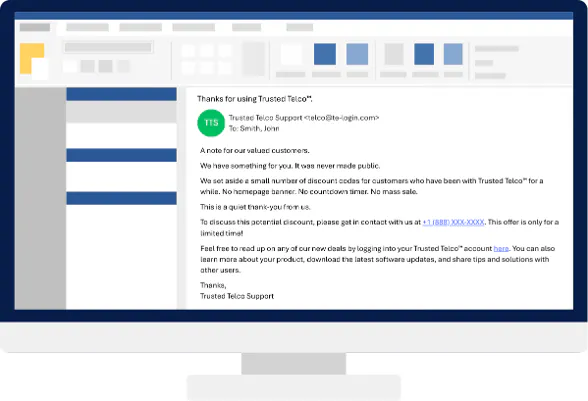
Right away, alarm bells ring! Here are some of the red flags:
- The email uses default formatting;
- The sender’s address doesn’t match previous communications;
- The message references a discount you’ve never heard of before;
- The ‘exclusive’ discount is mentioned alongside an urgent deadline.
This is a strong indication of a phishing email.
Even if you feel these red flags seem obvious, scammers will work hard to stop you from looking too closely. Many phishing attempts offer too-good-to-be-true rewards or are intentionally aggressive, using urgent language, repeated warnings, or short deadlines. The goal is simple: the more enticed, or alarmed, you feel, the less likely you are to think critically and the more likely you are to respond.
The below images compare a legitimate text from a bank, warning of potentially fraudulent activity, to a fake text with the same context. While comparing them, think about which one you’d be the most distressed to read with no warning.
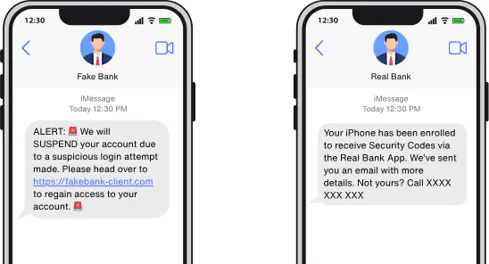
Pay attention to the sense of familiarity, trust, and urgency these scammers create with these simple tricks. Are you still as confident in your ability to notice the red flags? If you’re now a bit unsure, then you’re feeling the ‘hook’ that scammers invest significant time and resources perfecting.
2. The ‘Line’
We’ve looked at how phishing messages can ‘hook’ you into clicking a link, calling the number provided, or sharing personal information. Now what about a call, where all you have are the caller’s voice and number?
Thinking back to the email example, let’s look at what could happen if you called the phone number the scammers provided:
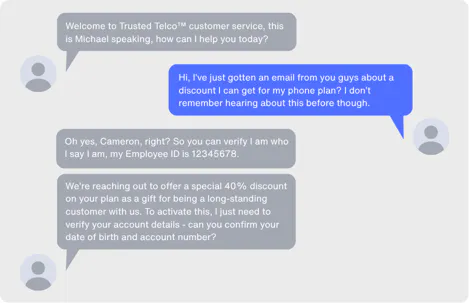
The call sounds believable enough, complete with an ID employee number – but cracks start to appear when you realise there’s no easy way to verify that number yourself. Scammers often rely on providing believable – but false - details to calm any initial suspicions, as long as the detail sounds plausible.
This can also extend to providing personal information that you’d expect a genuine caller to have, such as your name or address. Details from social media posts, data breach exposure, or involvement in past scams can all be used to make interactions seem genuine.
Another common tactic is directing you to legitimate looking forms or websites designed to capture your personal details.
3. The ‘Sinker’
If you noticed both the text and email examples included a link - great job! This is where the ‘Sinker’ comes into play. These links often lead to fake login or verification sites designed to trick you into entering details.
At this is stage, phishing attacks achieve their goal: stealing personal information, sensitive documents, login details, or money - and the scam has effectively succeeded.
IDCARE data shows that a quarter of all cases reported to us since May 2025 involve phishing, resulting in an average financial loss of $23,356 AUD.
By this point, any request for money or information should be treated as a major red flag - whether it’s a delivery fee for a missed parcel, a request to update account information, or an IT support impersonator asking for payment after gaining access to your device.
What you can do to reduce the risk
- Be cautious of unexpected calls, emails, or messages pushing for urgent action.
- Verify requests using official contact details before responding.
- Be wary of links directing you to login screens or asking to provide sensitive details.
- Ask the opinion of someone you trust if you’re unsure about the legitimacy of a message.
- Limit the amount of information you post online.
What you can do if you have been affected by a phishing scam
- Change passwords immediately and enable or reset two-factor authentication.
- Run antivirus scans on any devices.
- Identify any exposed identity documents and contact relevant agencies.
- Notify your bank immediately if financial details were shared.
- Disconnect any remotely accessed devices and have them checked by an IT professional.
- Block, report, and cease all contact with the scammer.
- Contact IDCARE.
For more information on scams and cybercrime, please visit our Learning Centre.
If you are an individual and feel you have been affected by a scam, please contact our National Case Management Centre on 1800 595 160 or submit a Get Help Form for free support and guidance.
If you are a Small Business and you feel you have been affected by a scam or would like to improve your cyber security, please contact our Cyber Security Clinic on 1800 595 170 or submit a SMB Help Form for free support and guidance. Additionally, you can take a free Small Business Cyber Health Check to assess your cyber resilience.
Join the global list of organisations making a real difference in people’s lives by supporting our service.















































Copyright © 2025, IDCARE. All Rights Reserved.
ABN 84 164 038 966